Edit or Delete Activities/ Sessions
Mobile and Website
Last updated Over 1 year ago
How to Edit or Delete Session (Mobile)
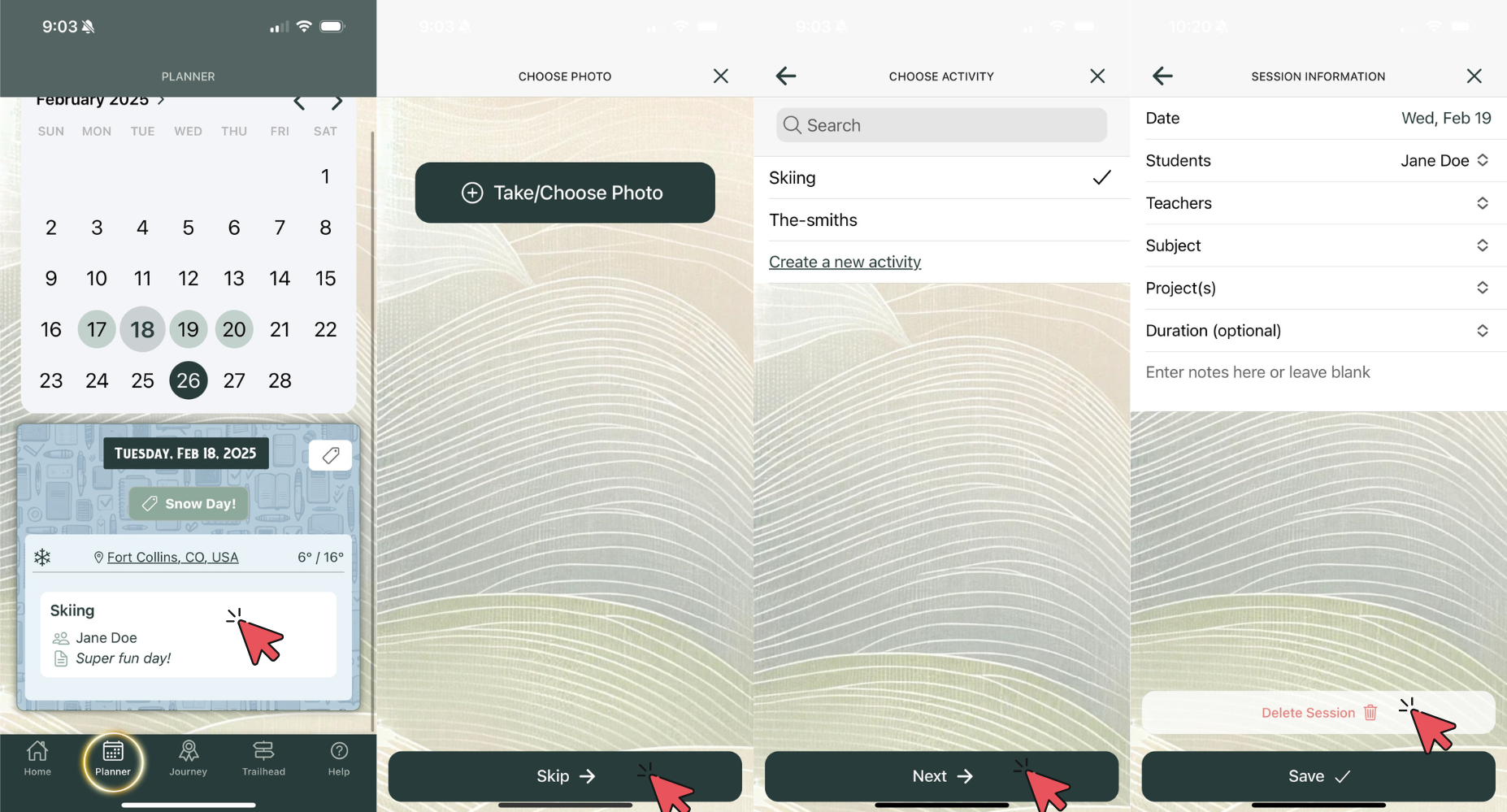
On mobile, you can edit or delete any planned activity by directing yourself to the planner section and clicking the session. You can add or delete photos, change the activity type, then go into details and change student, teacher, duration, and much more. You also now have the ability to delete the session from the mobile app. See the screenshot below for details.
How to Edit or Delete Session (Website)
Editing and Deleting on web is very similar to mobile. Simply navigate to the website and direct yourself to the planner tab. From here you can click on any planned session and a pop up menu with all the details will appear. You can scroll down to the very bottom to find the delete button.
How to Edit or Delete an Activity (Website Only)
Great news! You can now edit or delete your activities directly through the web version of HomeTrail. This update gives you more control over managing your activities easily and efficiently.
Check out the update in action here: Loom Video.
Was this helpful?
Still need help? Share an idea